Adventures in Credential Manager Trivia
I suppose I should explain. Credential Manager, aka CredMan, aka cmdkey, is this thing.
Social media warning: Like all good things this is mostly correct, with a few details fuzzier than others for reasons: a) details are hard on social media; b) details are fudged for greater clarity; c) maybe I'm just dumb.
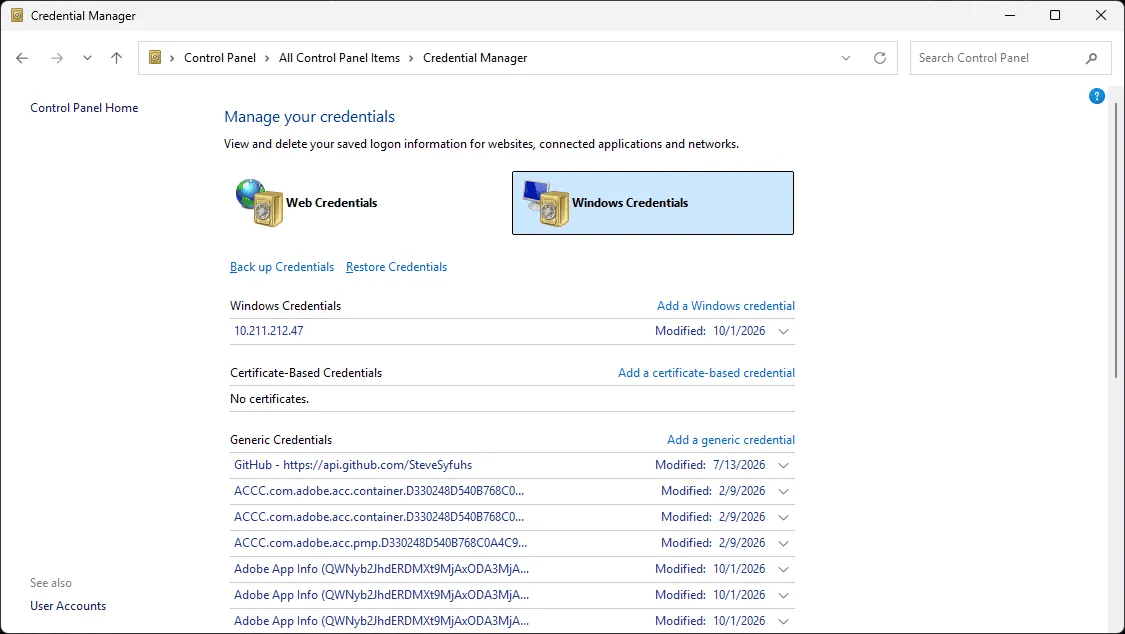
The UI has existed for decades and it really hasn't gotten a whole lot of love over the years. The last major overhaul was in the Windows 8 era when we built out Integrity Level-aware WinRT APIs that lived on top of the underlying Cred APIs.
The Cred APIs as we know them have existed since XP-ish but the functionality has predated XP all the way back to NT era. That's these things: CredWrite/CredRead/CredEnumerate/CredDelete/etc. It's CRUD over a database, plain and simple. learn.microsoft.com/en-us/window...
In typical Windows fashion it's more than that and all the gooey bits are hidden for simplicity. There are multiple dimensions to the Credential Manager. 1. How do we protect the credentials? 2. Who uses the credentials? 3. Can I roam the credentials? Hot topics today, but we had it in XP!
Lets go back in time to the 90s and consider the average business user: buncha computers in an office, one on every desk even (!), and users log into those beige boxes and get irradiated by the glow of an electron gun for hours and hours a day. Wait! Networks! Security! We must protect our widgets!

And so we had an explosion of security stuff. It wasn't good, but it was transformational. And that security stuff meant logging in to...stuff. Passwords.
Now in Windows world we had NT and soon Active Directory. A central place to orchestrate access to...stuff. One password to rule the world.
Except not everything was Windows (how dare) and not everything was ruled by Active Directory (sacrilege), or maybe you had two Active Directory's (acceptable).
When you connected to that thing you couldn't automatically auth to it so it prompted Ye Olde Cred Prompt and away you go.
That's fine, once, I guess, but what if you access this thing five times a day every day? It gets tedious. What if we put in a magical "Remember My Password" checkbox?
Now you can connect those 25 times a week and never get prompted again. Obviously brillant!
And thus is born the Credential Manager. Now, if you've ever considered building a password manager, first, my condolences for the braincells you lost, and second, it starts destroying your soul once you get into the weeds.
It's just CRUD over a database, right? How hard can it be?

Lets just rip the bandaid off: how the hell do you protect the long term storage of those passwords such that they're accessible when you need them and cannot be stolen?
The answer to this question is the first step to destroying your soul: it depends; define 'stolen'.
In the 90s and 2000s our general philosophy was, in a muchly distilled way, that the user is the security boundary and other users cannot steal your passwords. We still live by that rule, but more on that in a minute.
Goal: We protect passwords such that other users on the machine can't steal them.
In Windows we have isolation promises. Kernel mode from user mode, user A from user B, etc. Therefore it's pretty straightforward that user B shouldn't be able to grab user A's passwords off the disk. We can do that through ACLs.
But what if I'm an admin or I walk off with the hard drive?
Okay, not great. We need to protect the credentials such that only the user can touch them even if an attacker has the raw bytes. Oh, hello cryptography.
We encrypt the passwords!
To what? Which key? How do you protect /that/ key?
Dammit.

WELL what if we just prompt for a password to unprotect your passwords every time you need to use your passwords?
You want to prompt for a ...password... to unlock your database of ...passwords... in lieu of a ...prompt... from a resource asking for said... password?
Which, uh, password?
That's actually the lesser of two evil user experiences. What happens when you want to SAVE a password before the database is open?
Prompt > Save > Prompt > what, I just entered my password?? > WRONG PASSWORD TRY AGAIN, IDIOT.
And so we must make sure the database is accessible on first use and also protected from attackers walking off with hard drives, so what do?
Aha! What if we use the users password they logged into the computer with?!
Congratulations you've invented DPAPI: Data Protection API.
Your password is used as a key to unlock a wrapping key, which wraps more keys, which rotate every few months, and those keys are used to protect whatever arbitrary thing you want to protect. Good in theory.
I will save it for another story, but DPAPI is nevertheless a cursed technology.
So anyway, we now have a way to protect your passwords by using your logon credential. When you log on you unlock the database and when the machine is off the key isn't on disk so grabbing the hard drive yields nothing.
Actually that's not bad for the turn of the millenium.
Over the years a bunch of functionality was added to DPAPI and Credman for reliability and roaming.
The interesting side effect of having a key derived from your password is as long as you know your password you can derive that key wherever you want, so credential roaming just works.
I think it was in the Win 10 era where we provided an ability to sync your credman database across machines.
Incidentally, once upon a time, that used OneDrive to do the heavy lifting
Credential Guard also has protections for Credential Manager too. We do our darndest to prevent the release of those secrets by letting Cred Guard do the authy bits instead of normal world.
DPAPI has some key escrow behaviors against AD that let you recover corrupted intermediate keys so you can always get your data. This necessarily requires AD (or Entra too these days) because there's no other escrow entity you trust.
This is why local users prompt this horrid warning.

If you have a local user and you SET the password there is no mechanism to decrypt the DPAPI keys because the old password is, presumably, long gone.
CHANGE is fine since it requires you enter the existing password, so it can ratchet the keys.
But we're off on a tangent. Back to Credman.
You might have noticed an hour ago when this thread started that there are two tabs on the control panel: Web Credentials / Windows Credentials.
I've just described Windows credentials. Web credentials are, shockingly, used for websites by a browser, Internet Explorer and Edge (pre-chromium).
Now we get to the modern-ish world and we think about how attacks are very different. It's one thing for malware to steal a password to a file share on a corporate network you must physically be in a building to access.
It's wholly different if its a cred to a website accessible globally.
And so we get the crux of the problem with Credman.
Any process running as a user can query the credentials stored in credman for that user.
Why? Well, I've already answered that. Because the database must be accessible on first use because it could be a valid use case.
WELL WHY DON'T YOU DO SOMETHING ABOUT THAT THEN???
Ah, but what?
We could prompt every time you try and access the cred. "Do you want to release this cred to as-1-3-derp.dorp.bank.corp.com" Well, do you?? At a minimum its annoying and at a maximum its actively harmful.
We could...prompt once?
Okay, and then what? The evil thing just has to sit and wait until the first prompt happens and then away we go.
It limits the impact, but it's not a real solution.
But wait. It's DPAPI. Why can't I as an attacker just grab the files storing the database and run them through the DPAPI since I'm already running as the user?
Congratulations, you've just figured out the fundamental problem with credential managers.
Alright, what if we make DPAPI prompt fo--sorry sorry I just smacked myself in the head with a rubber hammer.
Suffice to say this would be an engineering nightmare. Doable, certainly, but it would break all, and I mean ALL, the apps.
Prompts alone aren't the right answer.
There are two problems with prompts. First, not all apps are able to prompt. Some might not be UI apps. They might be console apps or background services or scheduled tasks. Thou Shalt Not Prompt UI in a background service. It causes things to go bang.
The usual solution is ERR_SOME_PROMPT_REQD.
Return an error with some contextual information then pass that to CredPromptForAckOfWhateverW(context) and then whatever comes out of that is passed to DPAPI as extra goodies to suggest to the API yes its safe to release.
Who, uh, is writing that extra code?
Thus prompting is not the solution, or at least, not the primary.
The problem is that we need an additional secret that is temporal, that without it renders the decrypted DPAPI goop useless.
And that doesn't exist.
So back to the problem at hand: why don't we build out a better Credential Manager UI?
Well. More on that later.
--
I guess now is later.
Lots of folks have tried to build out a better UI on these APIs. It's not actually that hard as Scott showed when I started this thread. The APIs are all there.
Once upon a time, when I was a wee lad, I even tried this by way of convincing interns to do it.
Once upon a time a coworker and I pitched an idea to the Garage program. It's pretty cool. Unlike regular internships where some unfortunate soul is dropped into the middle of a random engineering team, the Garage is a team of interns building out a single project. www.microsoft.com/en-us/garage/
Orgs within the company pitch ideas to the interns and they pick one of a dozen and then spend the summer building it from scratch. Research, Design, Implementation, Validation, User Acceptance. The whole deal. At the end they present to the org leadership.
We pitched a bigger better credman.
They did a fantastic job building out the UX. It was fully functional. I used it and actually still have some records sitting in my corp credman database still. It was pretty cool.
Unfortunately it never shipped because it wouldn't scale in ways we needed.
The Cred APIs are just wrong for extended functionality. Adding properties is doable, but protected properties notsomuch. Length constraints are a big problem.
The security issues I mentioned up thread couldn't be addressed at the UX layer. It needed more work.
Suffice to say the UX remains. It's not a generic secret store. It shouldn't be used as one. The Windows SSO capabilities continue to be pretty solid, but as we move to a more modern world, we end up with less and less utility of it with newer protocols that aren't password-based.
Ah well.